A well-designed smart home should fade into the background. Lights respond, music follows you, the theater is ready when you are. But like every other system in a house, from the HVAC to the roof, it performs best with a little care. Here is what maintenance actually involves, and what we take off your plate.
Security housekeeping
Every connected device is a computer on your network, and the basics of protecting it are the same as for your laptop.
- Unique passwords and multi-factor authentication on the router, the automation app, and every account behind it. Reusing one password across services is the most common way a home system gets compromised.
- Firmware updates. Manufacturers ship security fixes regularly. Professionally installed platforms such as Control4 and Crestron are updated by the integrator, so they do not depend on you remembering.
- A properly segmented network. Guests, inexpensive smart-plug-style devices, and your core automation system should not all sit on the same network. Segmentation limits what a compromised gadget can reach.
- No open doors. Remote access should run through the manufacturer's secure cloud service or a VPN, never through ports opened on the router. We explain why in port forwarding vs. VPN.
Equipment care
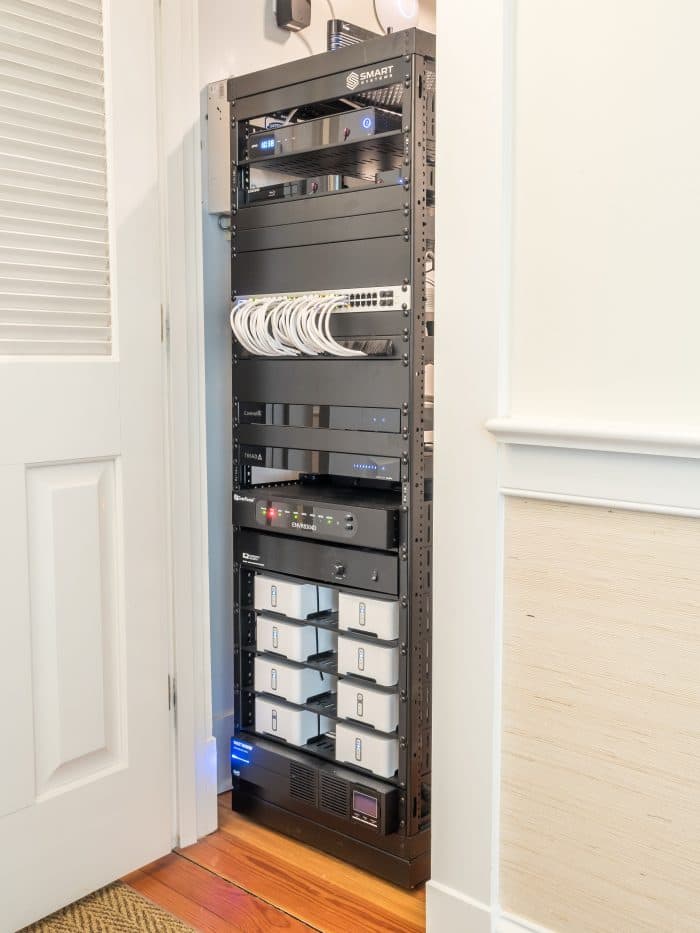
Most of a smart home's electronics live in a rack or closet, and that space needs airflow. Heat shortens the life of everything, so ventilation and occasional dusting matter more than people expect. A few items have known service lives: the batteries in an uninterruptible power supply are typically replaced every few years, projector light sources are rated in thousands of hours, and hard drives in a camera recorder eventually wear out. Knowing those dates in advance turns a surprise failure into a scheduled visit. Our guide to power protection covers the rack side of this in detail.
The network underneath
Almost every "the system is acting up" call we receive traces back to the network: an aging consumer router, a Wi-Fi access point that was fine for three devices and is now serving forty, or an internet provider change that nobody told the system about. Treat the network as the foundation it is. Enterprise-grade routers and wired access points, installed once and monitored, remove most of the intermittent problems that make a smart home feel unreliable. See our home networking page for how we build them.
Planning for change
Streaming services rebrand, phones get replaced, a new television arrives, a room changes purpose. A good system is designed to absorb this. Wiring that was run with spare capacity, control programming that can be revised remotely, and a platform with a long support life mean that adding a device is a small job rather than a new project. This is why we put so much emphasis on infrastructure during construction.
Where Smart Care comes in
Most of what is described above is exactly what our Smart Care plan exists to do. From our headquarters in Hixson we monitor client systems remotely, so we can see a device drop offline, a projector light source degrade, or a network path fail, and address it, often before anyone at home notices. Ongoing plans also cover troubleshooting, system updates, and expansion as needs change, which means the system you bought stays the system you have.
If you already own a system and want it looked after, or a system installed by someone else that never quite settled down, reach our support team or ask us about Smart Care.